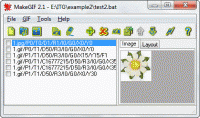
MakeGIF creates animated GIFs from command line in batch mode. You can use pictures created by MS Paint, Adobe Photoshop and dozens of others programs. MakeGIF has optimization tools for making your GIFs smaller. You can add hidden signatures to GIF.
MakeGIF helps you to create GIF- file from command line in batch mode. This program is visual command line processor. You can use pictures created by MS Paint, Adobe Photoshop and dozens of others programs.
Program features:
- creates GIF- files from images in BMP, JPEG (JPG), GIF, ICO, PSD, PNG, TGA, PCX, WMF, EMF- formats;
- edits, deletes and moves any image in the list of images;
- rotates, flips, duplicates and stretches images;
- defines animation parameters: number of loops for GIF- file and delay for each image;
- defines offset, transparency, interlacing, method of removing, using of global or local palette for each separate image;
- defines logical screen size in pixels;
- creates output GIF-files with fixed sizes ( for example, for mobile phone screens );
- optimizes size of GIF-file;
- saves specified global and frame attibutes for other animations as default;
- exports GIF- frames to BMP, JPEG, PNG, TIFF and TGA- files; GIF to BMP strip;
- adds hidden signatures to GIF- files to protect them from unauthorized use on the Web or in other media;
- checks up presence of your signatures in GIF- files;
- saves information about source graphical files and animation parameters in BAT- files;
- generates HTML link. Whats new in version 2.5: * Dialog "Edit frame attributes":
- change file name of source image;
- view width and height of source image;
- dynamic update on tab Layout of the main window.
* Dialog "Select transparent color": HEX-code of color. Requirements: No special requirements Operating system: WinXP,WinVista,Win7 x32,Win7 x64,Win2000,Win98,WinME,WinNT 3.x,WinNT 4.x,Win95 Limitations: 15 days trial Release notes: Minor Update
MagicBD is a graphic software which can be used to draw many kinds of iconographies, illustrations and sketch maps.It can also be used to edit images to process them or get some special effects.
Price: $28, Rating: 10, Downloads: 234 Download
Pos Free Photo Editor is a free photo editor from the authors of the best free professional photo editor - Photo Pos Pro free photo editor. The software is simple and very user friendly photo editor, that lets you easily view, and enhance your photos
Price: $0.00, Rating: 10, Downloads: 190 Download
Design over 10 photos by few mouse clicks. Easily create photo book, collage, calendar, greeting cards, wedding photos and more artworks.
Price: $39.95, Rating: 0, Downloads: 171 Download
Image Frame is a Photoshop-compatible plug-in for easy creation naturally-look 3D frame. Add frame and text to your photos. You can apply rectangular and elliptical frame, change frame profile, material, and lightening.
Price: $14.95, Rating: 10, Downloads: 160 Download
User Rating
Rating:2.2 out of
5 Based on13 ratings.
13 user reviews.

 MakeGIF 2.5 details